Friday, May 4, 2012

How I joined Commission Junction

Commision Junction is a website compounding a lot of advertisers with different products. It is really a great opportunity for publishers to be a member of it. Recently is know as cj.com.

Just today, I signed for an account on CJ:

  1. First, go to Commission Junction website 
  2. Click the Get Started
  3. Click the Publisher and an explanation of its function appears. You may also be an Advertiser, making your own Agency or Network.
  4. Then, click the Get Started Now.
  5. Complete all the necessary information needed for the registration as a publisher. And that's it.
To started on publishing ads with your blog:
  1. Go to Get Links.
  2. Choose your preferred categories for advertisers.
  3. Tip: Select all Advertisers so that you can find as many as you can at a time.
  4. Click the Apply to Program and see how many approvals you get.
To see how many advertisers approved you being their publisher:
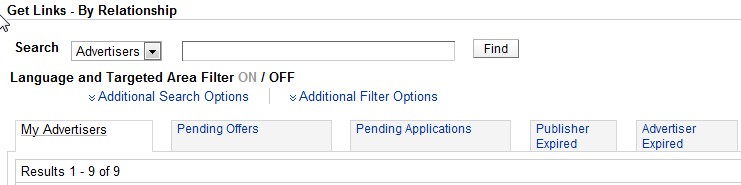
  1. Click By Relationship, still under Get Links.
  2. Click on your preferred Advertiser.
  3. Click on Get Links. A series of products or services they offered are shown.
  4. On the right end corner of the table, click on Get HTML.
  5. Then post it on your blog!
Here's mine:
My Commission Junction Ad
Let's see how these works with me. I'll have an updated post with these soon.

Saturday, March 24, 2012

Monetizing your blog through Chitika

Chitika Email
Finally, after a  month of waiting for the approval of being a publisher of Chitika, we can now finally enjoy it. It is said that Chitika is one of the most popular advertisement here in the blogosphere, so I tried to apply for the publisher's side. This is also one way of monetizing your blog, a good start being it successful.


The registration was easy, you just have to :
  1. Click the Publisher's Overview and then click the Get Started.
  2. Fill-out the Publisher Program-Apply
But, it doesn't mean that when your done with the registration, you can use it immediately. For we thought that after the registration it was then approved, but we were just disappointed for we can't even open my account. There was a reason, after a month of forgetting about, we were just surprised that on March 8,we received an e-mail from Chitika for the approval of our ads :). 

Thank God, we are using it for the moment together with my local ads.

Monday, March 12, 2012

How to put a Chatbox within your blog


I recently discovered a chat box from my follower Ms. Juicekodai, thanks to her. And I credit this post to her.

I just followed some simple steps to put up this widget.

    Sign up
  1. Sign-up - for the registration.
  2. Create your Cbox - 

3.  To change the colors or fonts, go to Look & Feel page. 


4.  Get code - for the HTML widgets. Go to Publish! to get the code for your Cbox to embed it on your blog.   

HTML Codes


And that's it. View your bog and start the conversation with your readers.


Related Posts Plugin for WordPress, Blogger...