Showing posts with label Special Widgets. Show all posts

Friday, September 7, 2012

Blogging Tools I Used


We all know that for some reasons, on daily basis, blogging tools are just like utensils, we need on our daily life, at our own appliances or gadget can you go without your phone? Or can you explore internet without connection, or simply can you write without your pen? It just answer the fact that your blog is nothing if blogging tools aren't present in any way.

The appearance of my blogs are almost the same, on the center are my posts, on the left and right, are the gadgets I thought are must-have's of any blog.

The 'must-have' blogging tools I used.

1. Easy Access 'Share Tools'

When readers find something interesting to share, they split it on social networking sites they enlisted. And that's a plus factor for bloggers to add for traffic. That's even another chance for shared allocation like on Facebook and Twitter.

2. Search Box

A way of looking for something on your blog is through 'searching'. It does expand the time a reader can spend on your blog and that's another plus factor for traffic.

3. Blog Archive, Labels and Popular Posts List

This is also another way for an easy access of the entire blog, also to navigate blog according to dates, titles or the popular posts enlisted.

4. Comment Box

Comments are important part of a blog. Bloggers do tend to communicate to readers through this. Another tip I read is that bloggers should encourage readers to reply or comment to whatever post they interact or engage.

5. Linking Older Posts to Latest Post

Linking your posts to each other will add a positive reputation to your blog and for traffic. Here's I wrote about How to use LinkedWithin to your posts.


These are just my top list blogging tools I used but I also experimented on exploring other tools that I thought are really quite usefull and effective for my blogs. So, for you, what are the tools you used and brought effectiveness on the improvement of your blog? Feel free to share us your thoughts.

Monday, July 16, 2012

Writing offline by Windows Live Writer

The technology as of today really embeds itself into modernization for a better life like for a new blogger like me, Windows Live Writer is really a great help.

I was really glad when I first discovered this tool. A great way on working offline with your blogs. These also features a theme from your blog so it does really look like your working on your blog online.

I am using Windows 7, so it has a more modern programs that really is very much useful. You could even make a draft and set a date to when it would be published. At least, you could make a progress out of your blog, working on writing more with a less expense on being online. It is also a way of making, using and developing your blog on a much lesser effort on finance, although wifi’s are everywhere, but not at all free.

So, try discovering and adding your blogs on Windows Live Writer and start enjoying your blogging today.

Thursday, June 21, 2012

Project Boards while making blogs

I would like to share this kind of affiliate program I just recently added on my blogs. I found this project board when I visited the Online Jobs Philippines website to find what's new. My eyes was caught with this project board which a lot of jobs are listed from time to time.

So I started visiting the site and sign-up for it as a member. On seconds, I became one. As I noticed, there are six free apps given to members namely:

  • Job Finder
  • My Site Stats
  • Free to choose
  • Free to choose
  • Free to choose
And you can choose between:
Free Apps

  1. Base CRM - which easily manage clients relations and track new leads [CRM]
  2. Docracy - lets you save legal expenses by using and e-signing documents with clients
  3. Fanzilla(which I also added in my free app) - helps you improve your facebook page to get more likes and leads.
  4. Itweetlive - automatically target new  relevant costumers on twitter.
  5. Billgrid.com - lets you send invoices, track payments and manage online expenses.
  6. Clockodo - track your working times quickly, simply and reliably online.
  7. Bookingbug - lets you take online booking inquiries from new and existing customers.
  8. Kashflow - intuitive, easy to use online accounting softwares for free lancers.
But what really made me involve in this site is that aside from giving you these free apps, it does also allow publishers like us bloggers to earn while posting some built-in project boards or listed-related-jobs.
Project Board

They offer a widget type to display listed jobs. And these was really a helpful kind of affiliate I've ever discover since the day I blog :).

To visit my project board, just click here and start finding jobs for you.

Friday, May 18, 2012

How to put links widget within your blog from your own posts?

Today, I had a visitor named GB, so I tried to visit his blog also. So, as I examined his blog, it was really wonderful. The whole is in a white background and that its clean and amazing. But what really amaze me more was the LinkWithin widget he had. It is the automated links within your blog. This was all I've been looking for months now and thanks to him.

Anyways, I hurriedly and excitedly signed-up for it.


  1. First, you open the website LinkWithin.

    2.    Then install the widget within your blog. Just follow the instructions given in LinkWithin.
Installing the widget within your blog.

    3.     Put it under your blog post. Then save. :)
Putting it under blog posts.

And that's it. But it will took hours for LinkWithin to set post related to each other. It's just ok anyway. The important about it is that you won't put link posts within your blog manually, right? Let's start enjoying it!Start making your blog.Set Up Your Blog Now!

Friday, May 4, 2012

How I joined Commission Junction

Commision Junction is a website compounding a lot of advertisers with different products. It is really a great opportunity for publishers to be a member of it. Recently is know as cj.com.

Just today, I signed for an account on CJ:

  1. First, go to Commission Junction website 
  2. Click the Get Started
  3. Click the Publisher and an explanation of its function appears. You may also be an Advertiser, making your own Agency or Network.
  4. Then, click the Get Started Now.
  5. Complete all the necessary information needed for the registration as a publisher. And that's it.
To started on publishing ads with your blog:
  1. Go to Get Links.
  2. Choose your preferred categories for advertisers.
  3. Tip: Select all Advertisers so that you can find as many as you can at a time.
  4. Click the Apply to Program and see how many approvals you get.
To see how many advertisers approved you being their publisher:
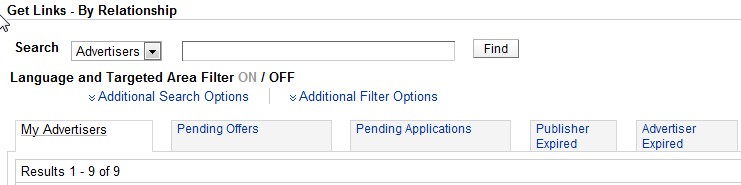
  1. Click By Relationship, still under Get Links.
  2. Click on your preferred Advertiser.
  3. Click on Get Links. A series of products or services they offered are shown.
  4. On the right end corner of the table, click on Get HTML.
  5. Then post it on your blog!
Here's mine:
My Commission Junction Ad
Let's see how these works with me. I'll have an updated post with these soon.

Monday, March 12, 2012

How to put a Chatbox within your blog


I recently discovered a chat box from my follower Ms. Juicekodai, thanks to her. And I credit this post to her.

I just followed some simple steps to put up this widget.

    Sign up
  1. Sign-up - for the registration.
  2. Create your Cbox - 

3.  To change the colors or fonts, go to Look & Feel page. 


4.  Get code - for the HTML widgets. Go to Publish! to get the code for your Cbox to embed it on your blog.   

HTML Codes


And that's it. View your bog and start the conversation with your readers.


Related Posts Plugin for WordPress, Blogger...